
 Cart
Cart
Simple Software
SimpleQB 5 Pack

Simple Software SimpleQB QuickBooks Scanning Module (requires SimpleIndex Standard) 5 pack
Login required to access pricing and demo downloads.
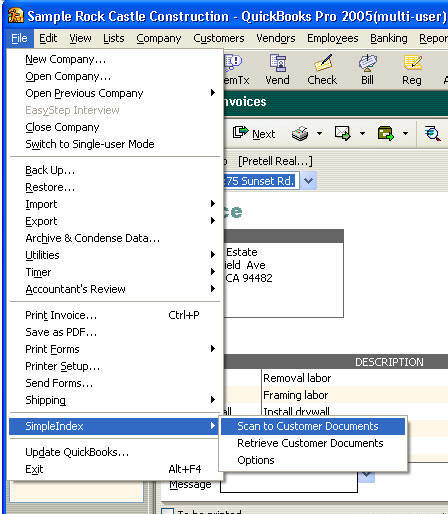
Turn your QuickBooks database into a document management system with SimpleQB! SimpleQB uses the information from your QuickBooks documents to file images under the appropriate customer/vendor, document type, document number and date. Simply pull up the corresponding file in QuickBooks and click scan!

SimpleQB also creates an MS Access database with references to all your scanned files. You can use this database for searching with SimpleSearch to give non-QuickBooks users access to files scanned with SimpleQB.
SimpleQB requires no configuration! Install SimpleIndex and SimpleQB and you are ready to scan out of the box!
SimpleQB adds a SimpleIndex scanning and viewing menu to QuickBooks. SimpleQB will automatically index scanned documents or files on your network using information from the current transaction such as Customer Name or Invoice Number. A second interface lets you view images associated with the current customer, vendor or transaction in SimpleIndex.
Unlike other QuickBooks scanning applications, SimpleQB comes with the full power of SimpleIndex. While scanning from within QuickBooks is efficient for day-forward operation, historical documents can be scanned more efficiently using the automation features of SimpleIndex. These files can be added to the SimpleQB database and viewed from within QuickBooks.
SimpleQB must be used with SimpleIndex Basic for indexing from QuickBooks, but you can add OCR and barcode recognition to add efficient batch scanning capabilities to your system. Additional users can view documents from QuickBooks using SimpleSearch. Only one SimpleQB license is required for all QuickBooks users.
Related Information:
Support
FAQ (Frequently Asked
Questions)
For Terms and Conditions of technical support and upgrades, click here.