
 Cart
Cart
Ricoh (Fujitsu) N7100 25ppm Color Duplex 8.5x120"


_Small.png)
Specifications
- Flatbed
- No
- ADF size
- 50
- Color
- Yes
- Paper size
- 8.5x120
- VRS
- No
- Resolution
- 600x600
- Multi-feed
- Yes
- Daily scans
- 1000
- U.S. warranty
- 1 Year
- Auto-crop
- Yes
- PC
- Yes
- Mac
- No
- Interface
- Network
- Part number
- PA03706-B205
Ricoh (Fujitsu) N7100 25ppm Color Duplex 8.5x120"
This scanner is currently unavailable or discontinued
This record has been provided to help you find parts for your scanner. The Website and Brochure links may stop working at any time.
Overview
Network Scanner to maximize business efficiency
With the functionality of many devices, yet the simplicity of one, the N7100 network scanner contains the qualities organizations of all sizes desire to improve business processes.

Ideal for Small and Medium Business
- Space saving design
- Multifunction functionality to reduce hardware costs
- Local user accounts
- Quiet operation
- Loaded with intelligent scanning features
- Outstanding price / performance
General office functionality
- Fast scanning speeds of 25 pages per minute and true double-sided speeds of 50 images per minute in color, grayscale or monochrome @ 300 dpi
- 50 page document feeder
- Large 8.4” touch screen high resolution (1,024 x 768 pixels) display
-
Scan to e-mail, folder/FTP, network fax or printer or Microsoft SharePoint
Server Enterprise features
*Limited version support for SharePoint* - Scanner Central Admin Server software
- Job Menu’s based on individual user login to control scanning settings and destination(s)
- High security to assist with compliance and regulation
- SDK and optional third-party applications for integration with line of business systems
Features
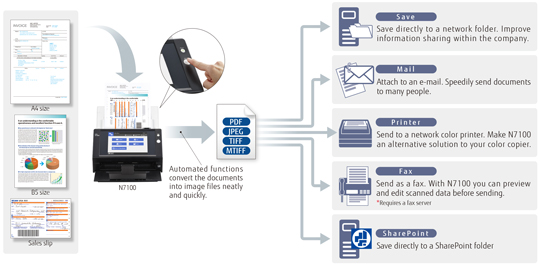
Easy Stand-alone Network Operation with Large Display
Large size screen with integrated on-screen keyboard and PC functions are equipped in this compact network scanner. It can be used in the office or a teller window where space is limited. The user can perform scanning, data saving and transmission without the need to operate from a computer.
-
Quick scanning speed that supports plastic card
Scanning speed is consistent at 25 pages per minute (ppm) even when scanning full A4 color, double-sided, at 300dpi. N7100 is equipped with accurate and stable feeding mechanisms that support scanning from thin paper to thick paper, and plastic card. Plastic ID card and application forms can be scanned together easily at a teller window of banks or hospitals. -
Less waiting time to achieve stress free scanning
In order for the user not to feel any stress, the image processing after scanning is quick thanks to the enhanced CPU/memory. The time from the start of scanning to the finish including image processing (when the preview of the last scanned page appears) is 50% shorter than the previous model(1). For regular scanning routines, only one touch of the scan button is necessary which greatly improves the productivity. -
High security assuming to be shared by multiple users
The N7100 achieves high security on the premise that it is shared by multiple users. Not only verification before scanning, but also encryption while processing and data deletion after scanning are performed automatically. Users can use the network scanner with peace of mind.- Login authentication strictly controls what people can do with the scanner.
- Scanned data can be output as password-protected PDF files.
-
Advanced security measures guard scanned data from prying eyes.
-
Encryption
N7100 encrypts and temporarily stores scanned data locally during processing for e-mails, faxes, printing and network storage. -
Scanned data deletion
After scanned data has been e-mailed, faxed, printed out or saved to a network folder N7100 automatically deletes the temporarily stored data from its internal memory. Even if an error results in the data remaining in the memory, it is then automatically erased the next time the scanner is started up. -
Secure Initialize
When N7100 is initialized, free regions of the internal memory can be overwritten with completely random, meaningless data. As an added security measure, a new cipher key is generated after the user information is deleted. All of this ensures that no trace of old user data can be retrieved from open memory.
-
Encryption
Perfect Fit Customized to Your Unique Needs
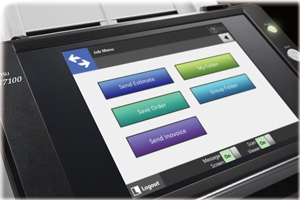 Administrators
can customize the touch panel job menu and scan settings of N7100 to suit the
work of a specific user or user group registered to the scanner. The user’s
application can be integrated to the scanner as add-in software using the
exclusive SDK (for Windows). N7100 comes with an open USB port to connect a
keyboard or other USB devices(2) (except
USB memory). N7100 can be customized to be a terminal exclusively for your
operation.
Administrators
can customize the touch panel job menu and scan settings of N7100 to suit the
work of a specific user or user group registered to the scanner. The user’s
application can be integrated to the scanner as add-in software using the
exclusive SDK (for Windows). N7100 comes with an open USB port to connect a
keyboard or other USB devices(2) (except
USB memory). N7100 can be customized to be a terminal exclusively for your
operation.
※To satisfy the security policy, anti-virus software can be installed as an option to safely expand the functions.
※The SDK (software development kit) allows for the development of scanner controlled workplace applications. The Network Scanner Control SDK is free to download. Support scheme is different by each sales region.
High Quality Results Perfectly Suited for OCR
The scanner driver PaperStream IP, which supports TWAIN saves the hassle in fine adjusting the document for OCR processes. It automatically converts the images into exceptionally clean images, accelerating OCR even when scanning wrinkled/soiled document or documents with a background.
Automated functions take the work out of scanning
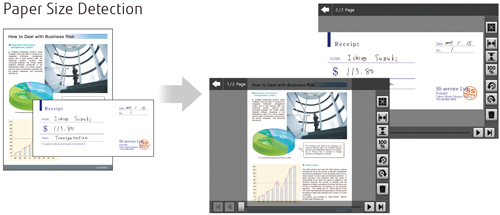
Advanced automated functions ensure N7100 digitizes your documents with remarkable precision and efficiency. Produce beautiful scans quickly with barely the need to lift a finger.
| Auto Orientation | Color Detection |
| Auto Deskew | Paper Size Detection |
| Blank Page Removal | Marker Index * |
* This function detects words marked with a highlighter and embeds them as keywords in PDF files.
Versatile range of use from SOHO to large enterprises
Connects with a variety of server types
N7100 easily satisfies the digitizing needs of small office networks which use a
file server and e-mail server. It is also right at home with more complex LDAP/LDAPS
authentication-based networks, integrated with Microsoft Exchange Server,
SharePoint and other application hubs.
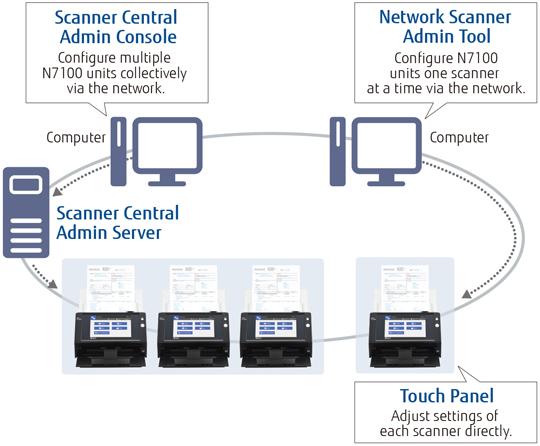
Set up and manage multiple N7100 scanners at one time
N7100 offers administration functions that allow you to individually or
collectively setup and manage a vast network of N7100 units with ease from a
single console.
-
Network Scanner Admin Tool
The Admin Tool function allows you to adjust running environment settings one scanner at a time. -
Scanner Central Admin Console/Scanner Central Admin Server
Collectively monitor and manage scanner usage, settings and much more for multiple N7100 units through the Scanner Central Admin Server function.
-
Time to scan 10 A4 sheets in color. Time from pressing the "scan" button
until the completion of image processing (preview image of the last page
appears) is 50% shorter compared to the predecessor N1800 (52 seconds
reduced to 24 seconds)
Output resolution: 200dpi, Output file format: Multi-TIFF
Image Processing: Auto color detection, Automatic page size detection, Rotation, Blank page skip, Multifeed detection - Only standard keyboard with layout of 109(Japanese) and 102(English) are supported. When using with other USB devices such as IC card reader, development of Add-in application using Network Scanner Control SDK (free download) is necessary.