
 Cart
Cart
ABBYY
FlexiCapture SDK for Windows Runtime Subscription 200K Pages
ABBYY FlexiCapture SDK for Windows Runtime Subscription 200K Pages
Login required to access pricing and demo downloads.
Abbyy FlexiCapture SDK Developer license General information
Runtime license gives right for production use of FlexiCapture functionalities built in developer's product. It is measured by page count and can only be bought after a Developer license. Runtime Invoice processing module is available as add-on under Runtime Subscription.
FlexiCapture SDK Licenses installation includes:
FlexiCapture SDK has 2 types of license protection depending on binding: Software protection - uses an activation file that should be obtained for a specific working machine from the ABBYY server during a license activation process; and Online protection - does not need activation, requires a persistent connection to the online licensing service, allows running FlexiCapture SDK inside the containers, on virtual machines and Public Cloud.
Prices are annual fee for 1-year Subscription, Pages per Year. Subscription license is automatically prolongued after one year. Standard SMUA (Annual Support, Maintenance and Upgrade Assurance - 20%) is included in the license price and grants access to upgrades/patches. Cannot be used for web-based Cloud and SaaS.
ABBYY FlexiCapture SDK Overview
ABBYY FlexiCapture SDK enables software developers to quickly create applications that extract meaning from documents. FlexiCapture SDK is ideal for system integrators, developers, and service providers who want to integrate powerful data capture capabilities into their solutions. Through the use of ABBYY’s machine learning and AI, end customers are able to process more transactions, faster, and with fewer errors, improving customer service, reducing costs, and making smarter process decisions.
FlexiCapture SDK, as a delivery option of the FlexiCapture platform, provides developers with a powerful and flexible toolkit to smoothly integrate ABBYY’s industry-leading data capture technologies to empower their own products and services according to vertical market needs.
FlexiCapture Overview
ABBYY FlexiCapture is a powerful data capture and document processing solution from a world-leading technology vendor. It is designed to transform streams of documents of any structure and complexity into business-ready data. And its award-winning recognition technologies, automatic document classification, plus a highly scalable and customizable architecture, mean that it can help companies and organizations of any size to streamline their business processes, increase efficiency and reduce costs.
What is Forms Processing?
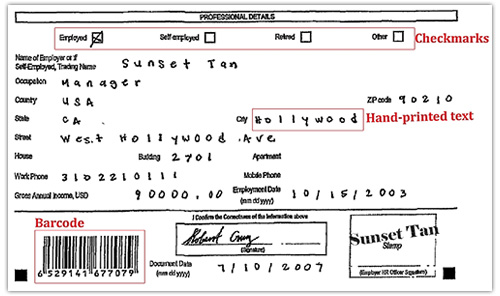
Forms processing is a process whereby information entered into data fields is converted into electronic form. Automated form processing software interprets machine-print (OCR), isolated handprint (ICR), mark sense (OMR) and barcodes from paper forms.
ABBYY FlexiCapture is highly accurate and scalable document imaging and data
extraction software that automatically transforms documents of any structure,
language or content into usable and accessible business-ready data.
Intelligent self-learning classification and state-of-the-art recognition technologies enable FlexiCapture to replace error-prone manual processes with automatic document classification and processing.
Flexible and customizable, FlexiCapture can handle virtually all document processing scenarios and can be tailored to any company’s workflows and regulations.

Document Input
Scanning Station
FlexiCapture Scanning Station enables easy scanning with any TWAIN-, ISIS- and
WIA-enabled device. Available in thick and thin client versions.

Image Improvement
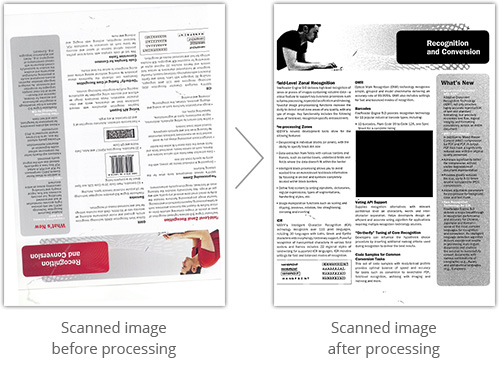
ABBYY Image Enhancement automatically improves images captured by mobile devices to optimize processing. It is also indispensable for processing documents with complex backgrounds like transcripts, identification documents and transportation forms, while automatically optimizing the image for processing or providing immediate feedback if image quality is poor. Features such as auto crop, background whitening, image quality assessment and capability to create custom enhancement profiles for different image sources, help process all documents regardless of their quality or source.
Recognition
At the recognition stage, document images are assembled into multi-page documents or document sets. Their content and data are intelligently extracted and validated automatically in an unattended mode.
Automatic Assembly of Multi-page Documents From a Mix of Pages
This task can be done either by separators (e.g. blank pages inserted between the two documents), page counters, or with the help of ABBYY neural-based classification algorithms that automatically identify.
Automated Image-base Classification
Highly Accurate OCR/ICR/OMR and Barcode Recognition
Automatic Validation
Verification
Verification station allows checking if extracted fields match those of the original document. Alternatively, verification can be started manually using the web-based verification station, easily accessible to a verification operator from any physical location. Any of the following techniques can be used:
Group Verification
Group verification allows verifying the similar checkmarks or digits across batch of documents by displaying all discovered versions in a single Verification window.
Verification in Document Window
Recognized data fields can be viewed simultaneously and compared against the original document image. Poorly recognized characters (e.g. handwritten text or notes) can be typed manually into the fields. A web verification station deployed on a third-party system can be accessed via single sign-on technology (using SAML 2.0). Users interact with the integrated web verification station the same way they interact with a non-integrated station.
Field Verification
Field verification mode enables automatic checking of data fields one by one, or the characters in a field.
Data Export
ABBYY FlexiCapture automatically exports recognized data to different file formats, or to databases, systems of record and other destination points in line with user-defined rules.
FlexiCapture provides export to:
Exporting document sets
WEB-Based Administration and Monitoring Console
FlexiCapture HTML5 administration and monitoring station enables 24/7 supervision from any physical location. It provides multi-level administration, automatic notifications for critical failures, and comprehensive reporting.
Ideal for Large Companies and International Business
International companies can now enjoy a single solution for processing documents in multiple languages - including Chinese, Japanese, Korean, Vietnamese and 183 more!
Fast ROI, Low TCO
Elimination of labor-intensive operations guarantees fast ROI, while web-based clients and easy-to-configure data extraction ensure low TCO.
Web-based Verification
Reduce costs and utilize your workforce more efficiently with Web-based data verification. Operators simply log in to perform manual verification tasks.
Front Office Document Capture
Capture documents at point of entry to reduce processing time, delivery costs and the space needed for storing paper documents. With the help of Web Capture Station, scanning and verification can be performed in a single web-based interface. This enables front office document capture without the need for a thick client application – and speeds business processes by capturing documents at point of origin then quickly delivering them to the back-end.
Optimized Performance and Fault Tolerance
Advanced server-based architecture enables effective processing of large volumes of documents. A powerful processing server handles all resource-intensive operations – performing automated task distribution among the processing stations and load balancing. Microsoft Cluster support ensures consistent system operation and prevents data loss in case of system failure.
Requires a full version of FlexiCapture SDK Developer license .
Maintenance & options
Keywords: FC12, SDK