Cart
Cart

Scanning Invoices
Use Scanning Invoices to locate and extract data from invoices and automate accounts payable processing.
Search Results for Scanning Invoices |
ABBYY Forms Processing Software
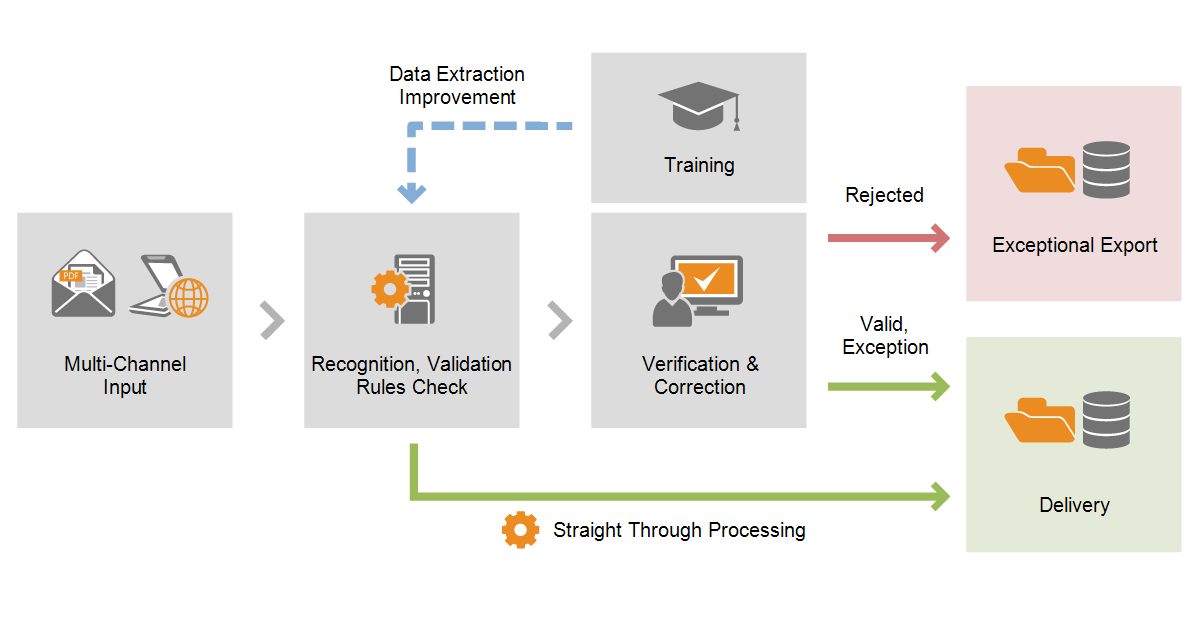
FlexiCapture for Invoices - Standalone - Basic - Subscription - 20K IPY/60K PPYThe invoice capture process1. Acquiring imagesThere are several ways to feed invoice images to the program:
2. Recognition and rule checksAfter input, invoices are automatically recognized by the program. Data from the invoices is then checked using rules and a status is assigned to the invoice based on the results of these checks. Invoices that do not require any
FlexiCapture for Invoices - Distributed - Subscription - Up to 30K IPY/ 90K PPYThe invoice capture process1. Acquiring imagesThere are several ways to feed invoice images to the program:
2. Recognition and rule checksAfter input, invoices are automatically recognized by the program. Data from the invoices is then checked using rules and a status is assigned to the invoice based on the results of these checks. Invoices that do not require any
FlexiCapture for Invoices - Distributed - Total Invoice Count (TIC) - Up to 30K IPY/ 90K PPYThe invoice capture process1. Acquiring imagesThere are several ways to feed invoice images to the program:
2. Recognition and rule checksAfter input, invoices are automatically recognized by the program. Data from the invoices is then checked using rules and a status is assigned to the invoice based on the results of these checks. Invoices that do not require any
FlexiCapture for Invoices - Distributed - Subscription - Up to 50K IPY/ 150K PPYThe invoice capture process1. Acquiring imagesThere are several ways to feed invoice images to the program:
2. Recognition and rule checksAfter input, invoices are automatically recognized by the program. Data from the invoices is then checked using rules and a status is assigned to the invoice based on the results of these checks. Invoices that do not require any
FlexiCapture for Invoices - Distributed - Total Invoice Count (TIC) - Up to 50K IPY/ 150K PPYThe invoice capture process1. Acquiring imagesThere are several ways to feed invoice images to the program:
2. Recognition and rule checksAfter input, invoices are automatically recognized by the program. Data from the invoices is then checked using rules and a status is assigned to the invoice based on the results of these checks. Invoices that do not require any
FlexiCapture for Invoices - Distributed - Subscription - Up to 100K IPY/ 300K PPYThe invoice capture process1. Acquiring imagesThere are several ways to feed invoice images to the program:
2. Recognition and rule checksAfter input, invoices are automatically recognized by the program. Data from the invoices is then checked using rules and a status is assigned to the invoice based on the results of these checks. Invoices that do not require any
FlexiCapture for Invoices - Distributed - Total Invoice Count (TIC) - Up to 100K IPY/ 300K PPYThe invoice capture process1. Acquiring imagesThere are several ways to feed invoice images to the program:
2. Recognition and rule checksAfter input, invoices are automatically recognized by the program. Data from the invoices is then checked using rules and a status is assigned to the invoice based on the results of these checks. Invoices that do not require any
FlexiCapture for Invoices - Distributed - Subscription - Up to 200K IPY/ 600K PPYThe invoice capture process1. Acquiring imagesThere are several ways to feed invoice images to the program:
2. Recognition and rule checksAfter input, invoices are automatically recognized by the program. Data from the invoices is then checked using rules and a status is assigned to the invoice based on the results of these checks. Invoices that do not require any
FlexiCapture for Invoices - Distributed - Total Invoice Count (TIC) - Up to 200K IPY/ 600K PPYThe invoice capture process1. Acquiring imagesThere are several ways to feed invoice images to the program:
2. Recognition and rule checksAfter input, invoices are automatically recognized by the program. Data from the invoices is then checked using rules and a status is assigned to the invoice based on the results of these checks. Invoices that do not require any
FlexiCapture for Invoices - Distributed - Subscription - Up to 300K IPY/ 900K PPYThe invoice capture process1. Acquiring imagesThere are several ways to feed invoice images to the program:
2. Recognition and rule checksAfter input, invoices are automatically recognized by the program. Data from the invoices is then checked using rules and a status is assigned to the invoice based on the results of these checks. Invoices that do not require any
FlexiCapture for Invoices - Distributed - Total Invoice Count (TIC) - Up to 300K IPY/ 900K PPYThe invoice capture process1. Acquiring imagesThere are several ways to feed invoice images to the program:
2. Recognition and rule checksAfter input, invoices are automatically recognized by the program. Data from the invoices is then checked using rules and a status is assigned to the invoice based on the results of these checks. Invoices that do not require any
FlexiCapture for Invoices - Distributed - Subscription - Up to 500K IPY/ 1.5M PPYThe invoice capture process1. Acquiring imagesThere are several ways to feed invoice images to the program:
2. Recognition and rule checksAfter input, invoices are automatically recognized by the program. Data from the invoices is then checked using rules and a status is assigned to the invoice based on the results of these checks. Invoices that do not require any
FlexiCapture for Invoices - Distributed - Total Invoice Count (TIC) - Up to 500K IPY/ 1.5M PPYThe invoice capture process1. Acquiring imagesThere are several ways to feed invoice images to the program:
2. Recognition and rule checksAfter input, invoices are automatically recognized by the program. Data from the invoices is then checked using rules and a status is assigned to the invoice based on the results of these checks. Invoices that do not require any
FlexiCapture for Invoices - Distributed - Subscription - Up to 750K IPY/ 2.25M PPYThe invoice capture process1. Acquiring imagesThere are several ways to feed invoice images to the program:
2. Recognition and rule checksAfter input, invoices are automatically recognized by the program. Data from the invoices is then checked using rules and a status is assigned to the invoice based on the results of these checks. Invoices that do not require any
FlexiCapture for Invoices - Distributed - Total Invoice Count (TIC) - Up to 750K IPY/ 2.25M PPYThe invoice capture process1. Acquiring imagesThere are several ways to feed invoice images to the program:
2. Recognition and rule checksAfter input, invoices are automatically recognized by the program. Data from the invoices is then checked using rules and a status is assigned to the invoice based on the results of these checks. Invoices that do not require any
FlexiCapture for Invoices - Distributed - Subscription - Up to 1M IPY/ 3M PPYThe invoice capture process1. Acquiring imagesThere are several ways to feed invoice images to the program:
2. Recognition and rule checksAfter input, invoices are automatically recognized by the program. Data from the invoices is then checked using rules and a status is assigned to the invoice based on the results of these checks. Invoices that do not require any
FlexiCapture for Invoices - Distributed - Total Invoice Count (TIC) - Up to 1M IPY/ 3M PPYThe invoice capture process1. Acquiring imagesThere are several ways to feed invoice images to the program:
2. Recognition and rule checksAfter input, invoices are automatically recognized by the program. Data from the invoices is then checked using rules and a status is assigned to the invoice based on the results of these checks. Invoices that do not require any
FlexiCapture for Invoices - Distributed - Subscription - Up to 2M IPY/ 6M PPYThe invoice capture process1. Acquiring imagesThere are several ways to feed invoice images to the program:
2. Recognition and rule checksAfter input, invoices are automatically recognized by the program. Data from the invoices is then checked using rules and a status is assigned to the invoice based on the results of these checks. Invoices that do not require any
FlexiCapture for Invoices - Distributed - Total Invoice Count (TIC) - Up to 2M IPY/ 6M PPYThe invoice capture process1. Acquiring imagesThere are several ways to feed invoice images to the program:
2. Recognition and rule checksAfter input, invoices are automatically recognized by the program. Data from the invoices is then checked using rules and a status is assigned to the invoice based on the results of these checks. Invoices that do not require any
FlexiCapture for Invoices - Distributed - Subscription - Up to 5M IPY/ 15M PPYThe invoice capture process1. Acquiring imagesThere are several ways to feed invoice images to the program:
2. Recognition and rule checksAfter input, invoices are automatically recognized by the program. Data from the invoices is then checked using rules and a status is assigned to the invoice based on the results of these checks. Invoices that do not require any |
|
This page was designed to help you find Scanning Invoices quickly and easily. Click Here to find Scanning Invoices. On-Site Support Available for much of the
Eastern US
|

 All FAQ Topics