Cart
Cart





Scanning Invoices
Use Scanning Invoices to locate and extract data from invoices and automate accounts payable processing.
|
Scanning Invoices
Scanning Invoices Guide

What is Scanning Invoices?OCR stands for Optical Character Recognition and is the technology that allows software to interpret machine printed text on scanned images. Invoice Processing Software uses OCR technology and page layout analysis to automatically identify the common data elements in an invoice, such as vendor, date, amount, invoice number, line item data, etc.. Invoice Processing applications are built using the same technology as data extraction applications, but have been specifically configured to recognize Invoices since they are one of the most common documents that companies need to automate. 
Who can benefit from Scanning Invoices software?Any organization that receives a large number of vendor invoices on paper can benefit from invoice processing technology. The more data from each invoice that you are hand-keying into your accounting software the more benefit you can get from each page you automate. Accounting firms and other companies that do outsourced accounts payable processing stand to gain the most return on investment from automation. It also has the benefit of on-shoring the data entry, providing additional security and piece of mind to your customers. A robust OCR invoice processing solution becomes justifyable when you have over 1,000 invoices per month. When dealing with smaller volumes the potential return on investment does not justify investment in an enterprise solution. However, a simple document capture solution to digitize and store scanned invoices can still provide many benefits. 
How much do Scanning Invoices systems cost?The total cost of a invoice processing solution includes several items:
Invoice Processing applications can be quite specialized and must be installed and configured by a certified professional. Once the initial configuration is complete, ongoing maintenance, including adding new vendor templates as needed, can be performed in-house or as part of an ongoing engagement with the ScanStore Professional Services team. Contact Us to get a professional analysis of your project requirements and a full time and cost estimate. 
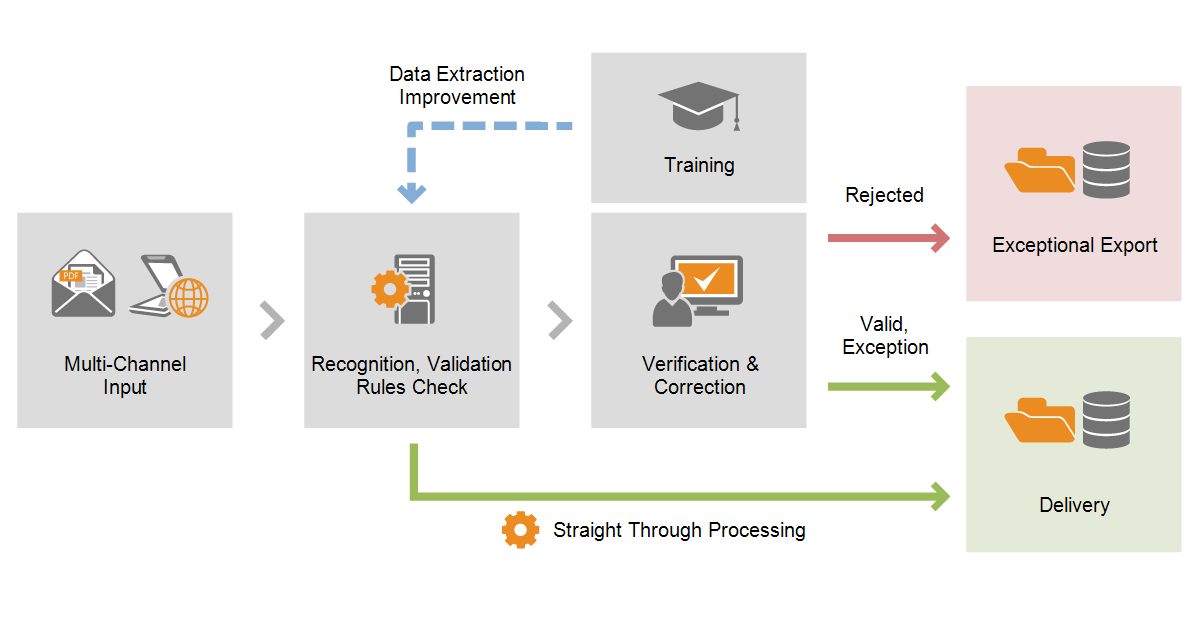
What is the typical data entry workflow?The process of converting a paper invoice to live data in your accounting system is as follows:

How do I find out more?
Solutions for Scanning Invoices
Compare Invoice Processing features side-by-side
|
||||
Search Results for Scanning Invoices |
||||
ABBYY Forms Processing Software
FlexiCapture for Invoices - Standalone - Basic - Subscription - 20K IPY/60K PPYThe invoice capture process1. Acquiring imagesThere are several ways to feed invoice images to the program:
2. Recognition and rule checksAfter input, invoices are automatically recognized by the program. Data from the invoices is then checked using rules and a status is assigned to the invoice based on the results of these checks. Invoices that do not require any
FlexiCapture for Invoices - Distributed - Subscription - Up to 30K IPY/ 90K PPYThe invoice capture process1. Acquiring imagesThere are several ways to feed invoice images to the program:
2. Recognition and rule checksAfter input, invoices are automatically recognized by the program. Data from the invoices is then checked using rules and a status is assigned to the invoice based on the results of these checks. Invoices that do not require any
FlexiCapture for Invoices - Distributed - Total Invoice Count (TIC) - Up to 30K IPY/ 90K PPYThe invoice capture process1. Acquiring imagesThere are several ways to feed invoice images to the program:
2. Recognition and rule checksAfter input, invoices are automatically recognized by the program. Data from the invoices is then checked using rules and a status is assigned to the invoice based on the results of these checks. Invoices that do not require any
FlexiCapture for Invoices - Distributed - Subscription - Up to 50K IPY/ 150K PPYThe invoice capture process1. Acquiring imagesThere are several ways to feed invoice images to the program:
2. Recognition and rule checksAfter input, invoices are automatically recognized by the program. Data from the invoices is then checked using rules and a status is assigned to the invoice based on the results of these checks. Invoices that do not require any
FlexiCapture for Invoices - Distributed - Total Invoice Count (TIC) - Up to 50K IPY/ 150K PPYThe invoice capture process1. Acquiring imagesThere are several ways to feed invoice images to the program:
2. Recognition and rule checksAfter input, invoices are automatically recognized by the program. Data from the invoices is then checked using rules and a status is assigned to the invoice based on the results of these checks. Invoices that do not require any
FlexiCapture for Invoices - Distributed - Subscription - Up to 100K IPY/ 300K PPYThe invoice capture process1. Acquiring imagesThere are several ways to feed invoice images to the program:
2. Recognition and rule checksAfter input, invoices are automatically recognized by the program. Data from the invoices is then checked using rules and a status is assigned to the invoice based on the results of these checks. Invoices that do not require any
FlexiCapture for Invoices - Distributed - Total Invoice Count (TIC) - Up to 100K IPY/ 300K PPYThe invoice capture process1. Acquiring imagesThere are several ways to feed invoice images to the program:
2. Recognition and rule checksAfter input, invoices are automatically recognized by the program. Data from the invoices is then checked using rules and a status is assigned to the invoice based on the results of these checks. Invoices that do not require any
FlexiCapture for Invoices - Distributed - Subscription - Up to 200K IPY/ 600K PPYThe invoice capture process1. Acquiring imagesThere are several ways to feed invoice images to the program:
2. Recognition and rule checksAfter input, invoices are automatically recognized by the program. Data from the invoices is then checked using rules and a status is assigned to the invoice based on the results of these checks. Invoices that do not require any
FlexiCapture for Invoices - Distributed - Total Invoice Count (TIC) - Up to 200K IPY/ 600K PPYThe invoice capture process1. Acquiring imagesThere are several ways to feed invoice images to the program:
2. Recognition and rule checksAfter input, invoices are automatically recognized by the program. Data from the invoices is then checked using rules and a status is assigned to the invoice based on the results of these checks. Invoices that do not require any
FlexiCapture for Invoices - Distributed - Subscription - Up to 300K IPY/ 900K PPYThe invoice capture process1. Acquiring imagesThere are several ways to feed invoice images to the program:
2. Recognition and rule checksAfter input, invoices are automatically recognized by the program. Data from the invoices is then checked using rules and a status is assigned to the invoice based on the results of these checks. Invoices that do not require any
FlexiCapture for Invoices - Distributed - Total Invoice Count (TIC) - Up to 300K IPY/ 900K PPYThe invoice capture process1. Acquiring imagesThere are several ways to feed invoice images to the program:
2. Recognition and rule checksAfter input, invoices are automatically recognized by the program. Data from the invoices is then checked using rules and a status is assigned to the invoice based on the results of these checks. Invoices that do not require any
FlexiCapture for Invoices - Distributed - Subscription - Up to 500K IPY/ 1.5M PPYThe invoice capture process1. Acquiring imagesThere are several ways to feed invoice images to the program:
2. Recognition and rule checksAfter input, invoices are automatically recognized by the program. Data from the invoices is then checked using rules and a status is assigned to the invoice based on the results of these checks. Invoices that do not require any
FlexiCapture for Invoices - Distributed - Total Invoice Count (TIC) - Up to 500K IPY/ 1.5M PPYThe invoice capture process1. Acquiring imagesThere are several ways to feed invoice images to the program:
2. Recognition and rule checksAfter input, invoices are automatically recognized by the program. Data from the invoices is then checked using rules and a status is assigned to the invoice based on the results of these checks. Invoices that do not require any
FlexiCapture for Invoices - Distributed - Subscription - Up to 750K IPY/ 2.25M PPYThe invoice capture process1. Acquiring imagesThere are several ways to feed invoice images to the program:
2. Recognition and rule checksAfter input, invoices are automatically recognized by the program. Data from the invoices is then checked using rules and a status is assigned to the invoice based on the results of these checks. Invoices that do not require any
FlexiCapture for Invoices - Distributed - Total Invoice Count (TIC) - Up to 750K IPY/ 2.25M PPYThe invoice capture process1. Acquiring imagesThere are several ways to feed invoice images to the program:
2. Recognition and rule checksAfter input, invoices are automatically recognized by the program. Data from the invoices is then checked using rules and a status is assigned to the invoice based on the results of these checks. Invoices that do not require any
FlexiCapture for Invoices - Distributed - Subscription - Up to 1M IPY/ 3M PPYThe invoice capture process1. Acquiring imagesThere are several ways to feed invoice images to the program:
2. Recognition and rule checksAfter input, invoices are automatically recognized by the program. Data from the invoices is then checked using rules and a status is assigned to the invoice based on the results of these checks. Invoices that do not require any
FlexiCapture for Invoices - Distributed - Total Invoice Count (TIC) - Up to 1M IPY/ 3M PPYThe invoice capture process1. Acquiring imagesThere are several ways to feed invoice images to the program:
2. Recognition and rule checksAfter input, invoices are automatically recognized by the program. Data from the invoices is then checked using rules and a status is assigned to the invoice based on the results of these checks. Invoices that do not require any
FlexiCapture for Invoices - Distributed - Subscription - Up to 2M IPY/ 6M PPYThe invoice capture process1. Acquiring imagesThere are several ways to feed invoice images to the program:
2. Recognition and rule checksAfter input, invoices are automatically recognized by the program. Data from the invoices is then checked using rules and a status is assigned to the invoice based on the results of these checks. Invoices that do not require any
FlexiCapture for Invoices - Distributed - Total Invoice Count (TIC) - Up to 2M IPY/ 6M PPYThe invoice capture process1. Acquiring imagesThere are several ways to feed invoice images to the program:
2. Recognition and rule checksAfter input, invoices are automatically recognized by the program. Data from the invoices is then checked using rules and a status is assigned to the invoice based on the results of these checks. Invoices that do not require any
FlexiCapture for Invoices - Distributed - Subscription - Up to 5M IPY/ 15M PPYThe invoice capture process1. Acquiring imagesThere are several ways to feed invoice images to the program:
2. Recognition and rule checksAfter input, invoices are automatically recognized by the program. Data from the invoices is then checked using rules and a status is assigned to the invoice based on the results of these checks. Invoices that do not require any |
||||
|
This page was designed to help you find Scanning Invoices quickly and easily. Click Here to find Scanning Invoices. On-Site Support Available for much of the
Eastern US
|

 All FAQ Topics