Scanning Invoices

Use Scanning Invoices to locate and extract data from invoices and automate accounts payable processing.

Advanced search

Not sure which software fits your documents?

Tell us about your documents and workflow, and we will recommend the right software and set up a demo or quote.

Search Results for Scanning Invoices

ABBYY Forms Processing Software

ABBYY FlexiCapture for Invoices - Standalone - Basic - Subscription - 20K IPY/60K PPY

FlexiCapture for Invoices - Standalone - Basic - Subscription - 20K IPY/60K PPY

The invoice capture process

1. Acquiring images

There are several ways to feed invoice images to the program:

    • Scanning hardcopy invoices
    • Downloading invoice images from an e-mail inbox
    • Downloading invoice images from a folder on a computer or an FTP server

2. Recognition and rule checks

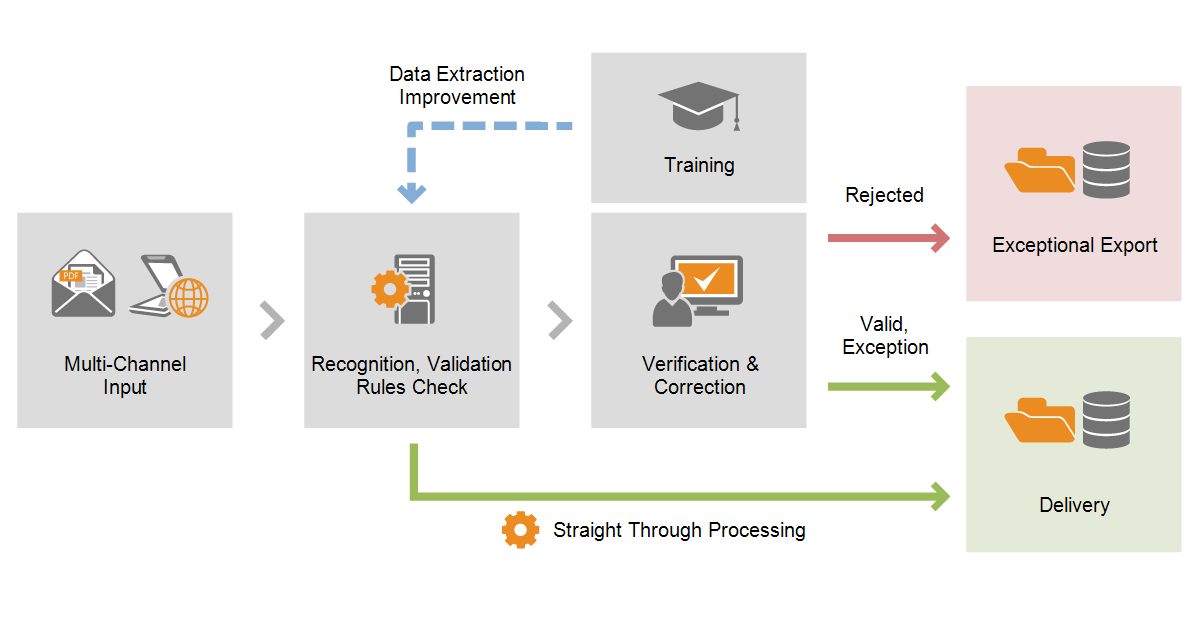
After input, invoices are automatically recognized by the program. Data from the invoices is then checked using rules and a status is assigned to the invoice based on the results of these checks.

Invoices that do not require any
more…

ABBYY FlexiCapture for Invoices - Distributed - Subscription - Up to 30K IPY/ 90K PPY

FlexiCapture for Invoices - Distributed - Subscription - Up to 30K IPY/ 90K PPY

The invoice capture process

1. Acquiring images

There are several ways to feed invoice images to the program:

    • Scanning hardcopy invoices
    • Downloading invoice images from an e-mail inbox
    • Downloading invoice images from a folder on a computer or an FTP server

2. Recognition and rule checks

After input, invoices are automatically recognized by the program. Data from the invoices is then checked using rules and a status is assigned to the invoice based on the results of these checks.

Invoices that do not require any
more…

ABBYY FlexiCapture for Invoices - Distributed - Total Invoice Count (TIC) - Up to 30K IPY/ 90K PPY

FlexiCapture for Invoices - Distributed - Total Invoice Count (TIC) - Up to 30K IPY/ 90K PPY

The invoice capture process

1. Acquiring images

There are several ways to feed invoice images to the program:

    • Scanning hardcopy invoices
    • Downloading invoice images from an e-mail inbox
    • Downloading invoice images from a folder on a computer or an FTP server

2. Recognition and rule checks

After input, invoices are automatically recognized by the program. Data from the invoices is then checked using rules and a status is assigned to the invoice based on the results of these checks.

Invoices that do not require any
more…

ABBYY FlexiCapture for Invoices - Distributed - Subscription - Up to 50K IPY/ 150K PPY

FlexiCapture for Invoices - Distributed - Subscription - Up to 50K IPY/ 150K PPY

The invoice capture process

1. Acquiring images

There are several ways to feed invoice images to the program:

    • Scanning hardcopy invoices
    • Downloading invoice images from an e-mail inbox
    • Downloading invoice images from a folder on a computer or an FTP server

2. Recognition and rule checks

After input, invoices are automatically recognized by the program. Data from the invoices is then checked using rules and a status is assigned to the invoice based on the results of these checks.

Invoices that do not require any
more…

ABBYY FlexiCapture for Invoices - Distributed - Total Invoice Count (TIC) - Up to 50K IPY/ 150K PPY

FlexiCapture for Invoices - Distributed - Total Invoice Count (TIC) - Up to 50K IPY/ 150K PPY

The invoice capture process

1. Acquiring images

There are several ways to feed invoice images to the program:

    • Scanning hardcopy invoices
    • Downloading invoice images from an e-mail inbox
    • Downloading invoice images from a folder on a computer or an FTP server

2. Recognition and rule checks

After input, invoices are automatically recognized by the program. Data from the invoices is then checked using rules and a status is assigned to the invoice based on the results of these checks.

Invoices that do not require any
more…

ABBYY FlexiCapture for Invoices - Distributed - Subscription - Up to 100K IPY/ 300K PPY

FlexiCapture for Invoices - Distributed - Subscription - Up to 100K IPY/ 300K PPY

The invoice capture process

1. Acquiring images

There are several ways to feed invoice images to the program:

    • Scanning hardcopy invoices
    • Downloading invoice images from an e-mail inbox
    • Downloading invoice images from a folder on a computer or an FTP server

2. Recognition and rule checks

After input, invoices are automatically recognized by the program. Data from the invoices is then checked using rules and a status is assigned to the invoice based on the results of these checks.

Invoices that do not require any
more…

ABBYY FlexiCapture for Invoices - Distributed - Total Invoice Count (TIC) - Up to 100K IPY/ 300K PPY

FlexiCapture for Invoices - Distributed - Total Invoice Count (TIC) - Up to 100K IPY/ 300K PPY

The invoice capture process

1. Acquiring images

There are several ways to feed invoice images to the program:

    • Scanning hardcopy invoices
    • Downloading invoice images from an e-mail inbox
    • Downloading invoice images from a folder on a computer or an FTP server

2. Recognition and rule checks

After input, invoices are automatically recognized by the program. Data from the invoices is then checked using rules and a status is assigned to the invoice based on the results of these checks.

Invoices that do not require any
more…

ABBYY FlexiCapture for Invoices - Distributed - Subscription - Up to 200K IPY/ 600K PPY

FlexiCapture for Invoices - Distributed - Subscription - Up to 200K IPY/ 600K PPY

The invoice capture process

1. Acquiring images

There are several ways to feed invoice images to the program:

    • Scanning hardcopy invoices
    • Downloading invoice images from an e-mail inbox
    • Downloading invoice images from a folder on a computer or an FTP server

2. Recognition and rule checks

After input, invoices are automatically recognized by the program. Data from the invoices is then checked using rules and a status is assigned to the invoice based on the results of these checks.

Invoices that do not require any
more…

ABBYY FlexiCapture for Invoices - Distributed - Total Invoice Count (TIC) - Up to 200K IPY/ 600K PPY

FlexiCapture for Invoices - Distributed - Total Invoice Count (TIC) - Up to 200K IPY/ 600K PPY

The invoice capture process

1. Acquiring images

There are several ways to feed invoice images to the program:

    • Scanning hardcopy invoices
    • Downloading invoice images from an e-mail inbox
    • Downloading invoice images from a folder on a computer or an FTP server

2. Recognition and rule checks

After input, invoices are automatically recognized by the program. Data from the invoices is then checked using rules and a status is assigned to the invoice based on the results of these checks.

Invoices that do not require any
more…

ABBYY FlexiCapture for Invoices - Distributed - Subscription - Up to 300K IPY/ 900K PPY

FlexiCapture for Invoices - Distributed - Subscription - Up to 300K IPY/ 900K PPY

The invoice capture process

1. Acquiring images

There are several ways to feed invoice images to the program:

    • Scanning hardcopy invoices
    • Downloading invoice images from an e-mail inbox
    • Downloading invoice images from a folder on a computer or an FTP server

2. Recognition and rule checks

After input, invoices are automatically recognized by the program. Data from the invoices is then checked using rules and a status is assigned to the invoice based on the results of these checks.

Invoices that do not require any
more…

ABBYY FlexiCapture for Invoices - Distributed - Total Invoice Count (TIC) - Up to 300K IPY/ 900K PPY

FlexiCapture for Invoices - Distributed - Total Invoice Count (TIC) - Up to 300K IPY/ 900K PPY

The invoice capture process

1. Acquiring images

There are several ways to feed invoice images to the program:

    • Scanning hardcopy invoices
    • Downloading invoice images from an e-mail inbox
    • Downloading invoice images from a folder on a computer or an FTP server

2. Recognition and rule checks

After input, invoices are automatically recognized by the program. Data from the invoices is then checked using rules and a status is assigned to the invoice based on the results of these checks.

Invoices that do not require any
more…

ABBYY FlexiCapture for Invoices - Distributed - Subscription - Up to 500K IPY/ 1.5M PPY

FlexiCapture for Invoices - Distributed - Subscription - Up to 500K IPY/ 1.5M PPY

The invoice capture process

1. Acquiring images

There are several ways to feed invoice images to the program:

    • Scanning hardcopy invoices
    • Downloading invoice images from an e-mail inbox
    • Downloading invoice images from a folder on a computer or an FTP server

2. Recognition and rule checks

After input, invoices are automatically recognized by the program. Data from the invoices is then checked using rules and a status is assigned to the invoice based on the results of these checks.

Invoices that do not require any
more…

ABBYY FlexiCapture for Invoices - Distributed - Total Invoice Count (TIC) - Up to 500K IPY/ 1.5M PPY

FlexiCapture for Invoices - Distributed - Total Invoice Count (TIC) - Up to 500K IPY/ 1.5M PPY

The invoice capture process

1. Acquiring images

There are several ways to feed invoice images to the program:

    • Scanning hardcopy invoices
    • Downloading invoice images from an e-mail inbox
    • Downloading invoice images from a folder on a computer or an FTP server

2. Recognition and rule checks

After input, invoices are automatically recognized by the program. Data from the invoices is then checked using rules and a status is assigned to the invoice based on the results of these checks.

Invoices that do not require any
more…

ABBYY FlexiCapture for Invoices - Distributed - Subscription - Up to 750K IPY/ 2.25M PPY

FlexiCapture for Invoices - Distributed - Subscription - Up to 750K IPY/ 2.25M PPY

The invoice capture process

1. Acquiring images

There are several ways to feed invoice images to the program:

    • Scanning hardcopy invoices
    • Downloading invoice images from an e-mail inbox
    • Downloading invoice images from a folder on a computer or an FTP server

2. Recognition and rule checks

After input, invoices are automatically recognized by the program. Data from the invoices is then checked using rules and a status is assigned to the invoice based on the results of these checks.

Invoices that do not require any
more…

ABBYY FlexiCapture for Invoices - Distributed - Total Invoice Count (TIC) - Up to 750K IPY/ 2.25M PPY

FlexiCapture for Invoices - Distributed - Total Invoice Count (TIC) - Up to 750K IPY/ 2.25M PPY

The invoice capture process

1. Acquiring images

There are several ways to feed invoice images to the program:

    • Scanning hardcopy invoices
    • Downloading invoice images from an e-mail inbox
    • Downloading invoice images from a folder on a computer or an FTP server

2. Recognition and rule checks

After input, invoices are automatically recognized by the program. Data from the invoices is then checked using rules and a status is assigned to the invoice based on the results of these checks.

Invoices that do not require any
more…

ABBYY FlexiCapture for Invoices - Distributed - Subscription - Up to 1M IPY/ 3M PPY

FlexiCapture for Invoices - Distributed - Subscription - Up to 1M IPY/ 3M PPY

The invoice capture process

1. Acquiring images

There are several ways to feed invoice images to the program:

    • Scanning hardcopy invoices
    • Downloading invoice images from an e-mail inbox
    • Downloading invoice images from a folder on a computer or an FTP server

2. Recognition and rule checks

After input, invoices are automatically recognized by the program. Data from the invoices is then checked using rules and a status is assigned to the invoice based on the results of these checks.

Invoices that do not require any
more…

ABBYY FlexiCapture for Invoices - Distributed - Total Invoice Count (TIC) - Up to 1M IPY/ 3M PPY

FlexiCapture for Invoices - Distributed - Total Invoice Count (TIC) - Up to 1M IPY/ 3M PPY

The invoice capture process

1. Acquiring images

There are several ways to feed invoice images to the program:

    • Scanning hardcopy invoices
    • Downloading invoice images from an e-mail inbox
    • Downloading invoice images from a folder on a computer or an FTP server

2. Recognition and rule checks

After input, invoices are automatically recognized by the program. Data from the invoices is then checked using rules and a status is assigned to the invoice based on the results of these checks.

Invoices that do not require any
more…

ABBYY FlexiCapture for Invoices - Distributed - Subscription - Up to 2M IPY/ 6M PPY

FlexiCapture for Invoices - Distributed - Subscription - Up to 2M IPY/ 6M PPY

The invoice capture process

1. Acquiring images

There are several ways to feed invoice images to the program:

    • Scanning hardcopy invoices
    • Downloading invoice images from an e-mail inbox
    • Downloading invoice images from a folder on a computer or an FTP server

2. Recognition and rule checks

After input, invoices are automatically recognized by the program. Data from the invoices is then checked using rules and a status is assigned to the invoice based on the results of these checks.

Invoices that do not require any
more…

ABBYY FlexiCapture for Invoices - Distributed - Total Invoice Count (TIC) - Up to 2M IPY/ 6M PPY

FlexiCapture for Invoices - Distributed - Total Invoice Count (TIC) - Up to 2M IPY/ 6M PPY

The invoice capture process

1. Acquiring images

There are several ways to feed invoice images to the program:

    • Scanning hardcopy invoices
    • Downloading invoice images from an e-mail inbox
    • Downloading invoice images from a folder on a computer or an FTP server

2. Recognition and rule checks

After input, invoices are automatically recognized by the program. Data from the invoices is then checked using rules and a status is assigned to the invoice based on the results of these checks.

Invoices that do not require any
more…

ABBYY FlexiCapture for Invoices - Distributed - Subscription - Up to 5M IPY/ 15M PPY

FlexiCapture for Invoices - Distributed - Subscription - Up to 5M IPY/ 15M PPY

The invoice capture process

1. Acquiring images

There are several ways to feed invoice images to the program:

    • Scanning hardcopy invoices
    • Downloading invoice images from an e-mail inbox
    • Downloading invoice images from a folder on a computer or an FTP server

2. Recognition and rule checks

After input, invoices are automatically recognized by the program. Data from the invoices is then checked using rules and a status is assigned to the invoice based on the results of these checks.

Invoices that do not require any
more…

More info on Scanning Invoices.

This page was designed to help you find Scanning Invoices quickly and easily. Click Here to find Scanning Invoices.

On-site support across East Tennessee
Online support available everywhere

From our office in Knoxville, TN we provide on-site installation, training and demos across East Tennessee, including Knoxville, Oak Ridge, Maryville and Alcoa, Chattanooga and the Tri-Cities. Everywhere else, including Nashville, our online setup, training and support make on-site visits unnecessary for most projects.

Click Here to find Scanning Invoices.

Current Category:
Invoice Processing

Other Items in This Category:
Three-Way Matching, Payables Processing, Payables OCR, OCR Invoices, OCR Invoice Scanning, OCR Invoice Processing, Invoice Workflow Automation, invoice scanning software, Invoice Scanning, Invoice Processing Workflow, Invoice Processing Systems, Invoice Processing Software, Invoice Processing Automation, Invoice OCR, Invoice Imaging Software, Invoice Document Management, Invoice Data Entry, Invoice Data Capture, Invoice Capture, Invoice Automation, Automated Invoice Processing, AP Invoice Scanning, AI Invoice Processing, Accounts Payable Scanning, Accounts Payable OCR, Accounts Payable Invoice Processing, Accounts Payable Imaging, Accounts Payable Automation

Pages related to Scanning Invoices:
Survey Scanning OCR Software - Scanning Survey, PDF Conversion - PDF scanning, OCR Software - text scanning software, ocr scanning software, OCR scanning, ICR Forms Processing - scanning recognition, forms scanning, Form & Survey Processing - Form Scanning Software, Kodak Document Scanning - Kodak Capture Pro Document Scanning, IRIS Document Scanning - IRISPowerscan High Speed Desktop Scanning, Simple Document Management Software - SimpleQB QuickBooks Scanning Module, Simple Document Imaging Software - Simple QuickBooks Scanning, QuickBooks Scanning Software, Kodak Document Imaging - Kodak Desktop Document Scanning, Business Document Management - Desktop Scanning, ScanStore SimpleIndex Scanning Software - Simple Scanning Software, Simple Barcode OCR Scanning, Kodak Imaging Software - Kodak Scanning Software, Digitech Systems PaperFlow - Digitech Systems Scanning Software, Batch Scanning - scanning image, scanning frontend, scanning front end, front end scanning, digital scanning, cheap scanning software, barcode scanning software, automatic scanning software, APIs and Toolkits - TWAIN Scanning SDK, scanning API, Simple Software Add-On Modules - Simple ISIS Scanning, ABBYY Add-On Modules - ABBYY FlexiCapture TWAIN Scanning Workstation, ABBYY FlexiCapture ISIS Scanning Workstation, Scanning Software - web scanning, twain scanning software, software for scanning, Scanning Tool, scanning software reviews, scanning software for canon, scanning software downloads, scanning software, scanning indexing software, scanning capture software, scanning a document, record scanning, photo scanning software, network scanning, microsoft document scanning, medical records scanning, Internet scanning, image scanning software, image scanning, high volume scanning, high speed document scanning, fast scanning software, electronic document scanning, document scanning system, document scanning solutions, Document Scanning Software, document scanning programs, document scanning pdf, document scanning and indexing, document scanning, Document Indexing Scanning, document imaging scanning, best scanning software, batch scanning software, Bar Code Scanning Software, archive scanning, Document Scanner - contact document scanning, Scanning Services - scanning outsourcing, scanning document services, Scanning Company, professional scanning service, professional document scanning, photo scanning service, paper scanning service, image scanning service, high volume document scanning, high speed scanning service, high speed document scanning, fast document scanning, document scanning storage, document scanning service bureau, document scanning service, document scanning quotes, document scanning prices, document scanning pdf, document scanning company, document scanning companies, document scanning business, document scanning bureau, document scanning archiving, document scanning and storage, document scanning and imaging, document scanning and archiving, document imaging scanning, document image scanning, confidential document scanning, Knoxville Tennessee TN - Tri-Cities document scanning, scanning Knoxville, Nashville document scanning, Knoxville scanning service, Knoxville document scanning, Chattanooga document scanning, Document Imaging - scanning solution, Document Scanning Systems, Document Scanning Services, Mortgage Document Management - loan scanning, Invoice Processing - Scanning Invoices, OCR Invoices, OCR Invoice Scanning, invoice scanning software, Invoice Scanning, AP Invoice Scanning, Accounts Payable Scanning, ICR Software - icr scanning software, icr scanning, Forms Processing Software - form scanning, HIPAA Document Management - hippa scanning, hipaa scanning, healthcare scanning, health care scanning, doctor scanning, Document Management Software - scanning and document management system, document management scanning, Document Imaging - digital document scanning

Meta Enterprises, LLC - Knoxville, TN
Scanning Invoices at ScanStore.com
Freeware OCR Software and Royalty Free OCR SDK
Document Scanning, OCR and Barcode Recognition Software
Scanning Invoices at SimpleIndex.com
Mortgage Document Scanning and OCR
Find Pipettors and Pipette Tips

Click Here to find Scanning Invoices.